Make sure your clients websites are optimised for their target customers.
Add customer experience assurance to your agency. Investigate potential conversion risks, uncover work worth scoping and keep client journeys under review - with browser evidence your specialists can inspect.
An enquiry CTA is partly covered on mobile.
In this example, a promotional panel overlaps the enquiry button. The recorded state gives the reviewer something specific to inspect before deciding whether it is a barrier or friction.
Reproduce on a real phone and check whether the panel can be dismissed. If a fix is warranted, retest the interaction and measure enquiry performance separately.
A more proactive service across your client portfolio.
Give clients a reason to keep you involved between launches. Make journey checks, reviewed recommendations and follow-up evidence part of the work you deliver.
Protect client performance
Check important journeys after website updates, campaign launches and content changes. Give your team a chance to investigate problems before the next client performance review.
Build a stronger assurance process with fewer avoidable surprises.
Find work worth proposing
Identify potential improvements your agency can verify, scope, implement and validate. Connect each proposal to the client's goal and the evidence behind it.
Create a repeatable source of potential optimisation work.
Expand your review capacity
Automate initial journey exploration and evidence collection. Let specialists spend more of their time reviewing, prioritising and advising across accounts.
Evaluate how much more your team can cover without adding the same amount of manual work.
Every review. A repeatable service, shaped by your expertise
Give clients a reason to keep improving between launches.
PersonaQA supplies the assessment; your review, advice and implementation expertise shape the client engagement. Your agency decides which findings matter, what to recommend and how to scope the work.
Assess. Improve. Protect.
Start with a one-off client assessment, turn the evidence into an action plan, then protect the customer journey over time.
Assess
Enter a client URL and choose the relevant assessment. Simulated customers explore the real website in parallel.
Improve
Review the evidence, share the findings that matter and scope work with the client. Check the fix with a rerun; validate its impact using real outcomes.
Protect
Run assessments after releases or on a useful schedule, then investigate meaningful changes before raising them with the client.
Give clients a clear explanation of what to improve.
Start with Customer Intelligence for potential conversion barriers. Use Search Credibility or UX & Accessibility when those are the focus of the brief.
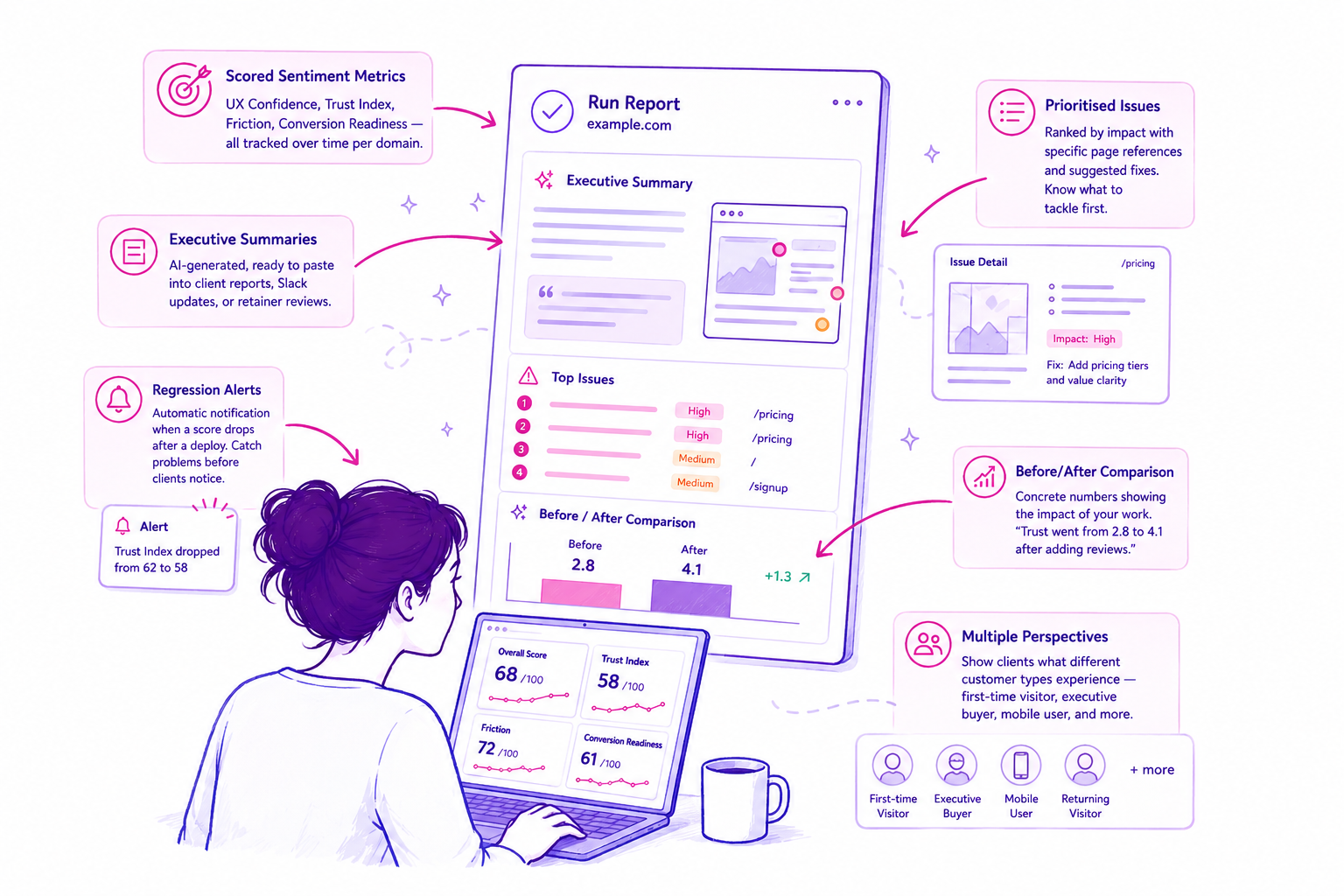
Review the evidence before sharing. Use relevant findings in a client discussion, your own deliverable or the scope for the next piece of work.
Three lenses.
One prioritised picture.
Choose the question your client needs answered. Every Snapshot consolidates multiple specialist perspectives into clear findings and actions.
Customer Behaviour
See where simulated customers hesitate, why they might abandon and what should be fixed first.
- Conversion decisions and reasons
- Trust, clarity and pricing friction
- Priorities ranked by likely impact
Search & AI Credibility
See how clearly search engines and AI systems can understand, trust and reference the client website.
- Search-intent fulfilment
- Expertise and credibility signals
- AI and structured-content readiness
UX & Accessibility
Find usability, mobile and accessibility barriers that make important journeys harder to complete.
- Navigation and interaction friction
- Mobile and cognitive-load issues
- Evidence mapped to standards
The launch ends.
Your client's website keeps changing.
A one-off audit covers the journey at that moment. Ongoing assurance gives you a reason to return after releases, campaign launches and content changes, with a clear review cadence in the client retainer.
Baseline → Monitor → Investigate → Improve. Agree the journeys and devices, schedule checks, review changes and record the next action. Your team owns the judgement and client advice.
The simulated visitor reached the enquiry form from the service page.
The CTA moved into the menu. Test that route before concluding the enquiry is blocked.
Put potential problems in the context of real visitors.
Connect supported tools such as GA4 and PostHog to bring observed behaviour into your review. Start without analytics when a website is new or has limited traffic.
What the test encountered
Use browser observations to understand a specific obstacle in a tested journey and inspect the evidence behind it.
What your customer data shows
Use available analytics to assess relevance and look for supporting or conflicting signals from observed visitor behaviour.
What still needs checking
A simulated hesitation is a hypothesis about visitors. Validate the conclusions that matter with appropriate customer evidence or experiments.
Try one report before choosing your agency plan.
Assess the quality of the findings on a site you know. Then choose the report and testing allowance that fits your client workload.
Check complete reports, individual tests, domains and branding options against the current plan details.
Frequently asked questions
How is this different from asking ChatGPT to review a website?
AI assistants with browser tools can explore websites and suggest improvements. PersonaQA packages specialist assessments, structured evidence, reports and repeat reviews into a dedicated workflow. Compare the findings and the time needed to prepare a usable client deliverable on a website you know.
Are simulated customers the same as real user research?
No. They help surface potential obstacles and questions to investigate. Browser evidence can establish what happened during a test, but a simulated decision does not establish how real customers will behave. Use customer research and analytics to validate the conclusions that matter.
Can I use the findings in a paid agency service?
You can build reviewed findings into a website assessment, improvement proposal or ongoing client review. Define the scope clearly, explain the role of AI simulation and include your own judgement.
Can I brand reports for my agency?
Business includes white-labelled reports. You can share an unlocked report by link for a client to read; that link does not grant access to your private dashboard. Compare the plan allowances when planning a client service.
What should I check before sharing a report?
Review the key evidence, confirm the findings are relevant to the client’s goals and remove anything already addressed or outside the agreed scope. Treat suggested fixes as recommendations to assess.
Do I need GA4 or PostHog connected?
No. You can begin with the website assessment alone. Connecting supported analytics adds context from observed usage where suitable data is available.
Does a better score prove that my work increased conversion?
No. A better score means the assessment changed. Inspect the underlying evidence to understand why, then use real outcome data or a suitable experiment to assess conversion impact.